
Hosting · Published on November 2, 2026
What is web hosting? What it means, how it works and how to choose it
ViceSite · Vicedomini Softworks srl
What web hosting is, how it works, how it differs from domains and DNS, and which type to choose for your business, with a focus on shared hosting.

Web hosting is the service that keeps your website on a server that is always on and connected to the Internet, so anyone who types in your address can view it at any time. In practice, you rent space from a provider that takes care of the hardware, connection and maintenance, while you focus on your content and customers. Without hosting, a website does not exist online: its files stay on the computer of whoever created them, and no one else can access them. In this guide, we look at what hosting really means, how it works step by step, how it differs from domains and DNS, what types of hosting are available, and why shared hosting is the most sensible choice for most small businesses and professionals.
At a glance
- Hosting is the space on a server where your website’s files, databases and often email accounts live, managed by a provider that keeps it online.
- Domains and hosting are two different things: the domain is the name (tuaimpresa.it), while hosting is where the website lives. DNS connects the two.
- There are several types: shared, VPS, dedicated, cloud and managed. They differ in resources, control and the level of technical expertise required.
- Shared hosting hosts multiple websites on the same server and is suitable for brochure websites, business blogs and professional websites.
- To make the right choice, look at security, backups, included email accounts, support in Italian and clear prices with VAT already included.
Contents
- What hosting means
- How hosting works, from domain to page
- Hosting, domains, servers and DNS: the differences
- What a hosting plan includes
- The main types of hosting
- Shared hosting: what it is and why it makes sense for SMEs and professionals
- How to choose hosting for your business
- ViceSite’s perspective
- Hosting, domains and websites with ViceSite
- Frequently asked questions
- Sources
What hosting means
The term comes from the verb to host: the provider “hosts” your website on its own machines. The Treccani encyclopedia defines hosting as a service for placing content on web servers, offered free of charge or for a fee, to make it accessible online.
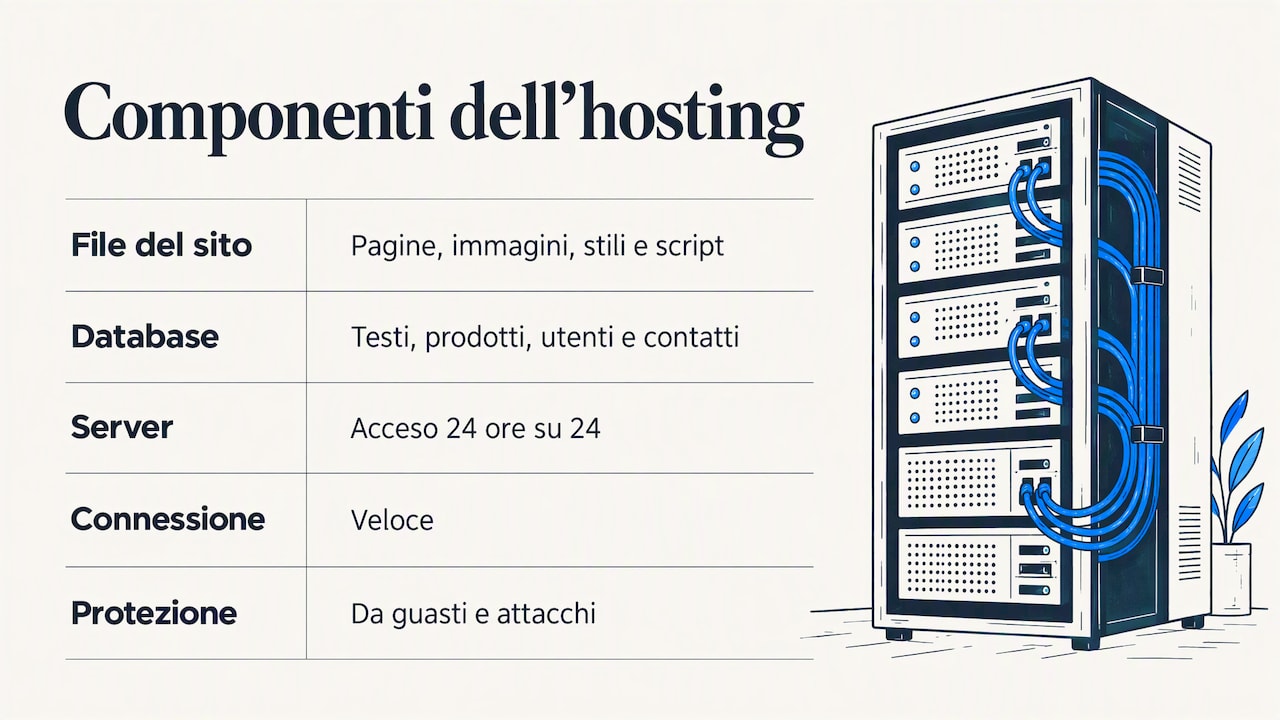
More concretely, a website consists of files (pages, images, stylesheets and scripts) and almost always a database containing text, products, users or contact enquiries. These elements need to be stored on a special computer, the server, which runs 24 hours a day, has a fast connection and is protected against failures and attacks. Keeping a server in your office would be expensive and complicated: you would need a continuous power supply, cooling, security updates and someone to step in at night if something stopped working.
That is why almost all businesses rely on a hosting provider. According to TechTarget’s definition, hosting involves storing and maintaining files and applications on one or more servers, either physical or virtual, with resources such as bandwidth, RAM and disk space depending on the plan you choose. You pay a subscription fee and get your own share of infrastructure, ready to use and maintained by someone else.
A useful analogy is a rented shop: the domain is the sign and address, while hosting is the premises where you keep your goods and welcome customers. You can have a beautiful sign, but without premises, no one can come in.
How hosting works, from domain to page
Every time someone opens your website, a sequence of steps takes place in a fraction of a second. Here is what happens, in order:
- The user types the domain into their browser, for example tuaimpresa.it, or clicks a link on Google or social media.
- The browser asks DNS where the website is. The Domain Name System translates the name into an IP address: the numerical “location” of the server hosting the website.
- The browser contacts the server and sends a request using the HTTP protocol or, preferably, HTTPS, its encrypted version.
- The server responds by sending the necessary files: the page code, images, fonts and scripts. If the website is dynamic, such as one built with WordPress, it first retrieves content from the database and assembles the page.
- The browser puts everything together and displays the page to the visitor.
This is exactly the process described by TechTarget in its web hosting guide: the domain is translated into an IP address, the browser sends the request, and the server returns the page files. How quickly this happens depends heavily on the hosting: server power, connection quality and software configuration. That is why two identical websites can perform differently with two different providers.
The same server, or a connected one, usually handles email too: when a customer writes to info@tuaimpresa.it, the message arrives in the mailbox hosted by your provider. If you want to understand how this works, we have written a guide on how to get a professional email address using your domain.
Hosting, domains, servers and DNS: the differences
These four terms are always mentioned together and are often confused. Here is the difference in a table:
| Term | What it is | Practical example |
|---|---|---|
| Hosting | The service that provides space and resources for the website | Disk space, memory, databases, email, backups |
| Server | The physical or virtual computer that runs the website and responds to requests | The machine in the provider’s data centre |
| Domain | The name people use to reach the website | tuaimpresa.it |
| DNS | The system that links the domain name to the server’s address | The “sat nav” that takes you from tuaimpresa.it to the right server |
The practical implication matters: domains and hosting can be purchased together or separately, and a domain can be pointed from one hosting service to another by changing its DNS configuration. For a small business, however, keeping them with the same provider makes things much simpler: one point of contact, one renewal date to remember, and no passing the buck when something goes wrong. What matters is that the domain remains yours and you can take it elsewhere whenever you want.
What a hosting plan includes
When comparing two offers, look at what is included. Treccani lists web space, email accounts, bandwidth, applications, traffic statistics, management tools and databases among the typical resources of a hosting service. Let’s look at each from a business owner’s perspective:
- Web space: how much room you have for files, images and documents. A brochure website with a few dozen pages uses little space; a catalogue with lots of photos needs more.
- Bandwidth and traffic: the amount of data the server can transfer to visitors. This matters when your website gets lots of visits or hosts large files.
- Databases: essential for WordPress and any website with updatable content, contact forms or a customer area.
- Email accounts: addresses using your domain, which convey far more professionalism than a generic address.
- SSL certificate: enables HTTPS and the padlock in the browser bar, now a basic requirement for visitor trust.
- Backups: regular copies of your website so you can restore it after an error, a failed update or an attack.
- Control panel and statistics: tools for checking traffic and managing email, files and settings.
- Server operating system: as the same Treccani entry notes, plans may also differ by platform, such as Linux or Windows. Most websites, including WordPress sites, run on Linux.
- Support: who responds, in which language, how quickly and through which channels.
If security is your main concern, you can find more detail in our guide to what secure hosting should guarantee for a business.
The main types of hosting
Not all hosting is the same. The difference lies in how server resources are divided and how much of the management is left to you.
| Type | How it works | Who it is for |
|---|---|---|
| Shared hosting | Multiple websites on the same server, with shared resources and management handled by the provider | Brochure websites, professionals, small businesses, business blogs |
| VPS (virtual private server) | A physical server divided into virtual environments, each with reserved resources | Growing projects with specific technical requirements |
| Dedicated server | An entire machine reserved for a single customer | Businesses with resource-intensive applications and an in-house technical team |
| Cloud hosting | The website relies on a group of interconnected servers | Websites with highly variable traffic spikes |
| Managed hosting | The provider also handles updates, backups and monitoring | Anyone who wants to delegate the technical side |
VPS and dedicated servers offer plenty of freedom, but they require someone who knows how to configure, update and protect them: they are tools designed for technicians and developers. For a business that simply wants a website that works, shared hosting almost always offers the best balance of simplicity, reliability and cost, especially when the provider adds management and genuine support.
Shared hosting: what it is and why it makes sense for SMEs and professionals
With shared hosting, the provider hosts multiple websites on the same server. Treccani describes it as the standard model, in which hosted websites share processing and transmission capacity. It is like an office building: each company has its own locked space, but the building, electrical system and reception are shared and maintained by the building manager.
Why does it work so well for small businesses? There are three practical reasons:
- Affordable costs: sharing infrastructure gives you professional servers, fast connections and advanced protection at a fraction of the cost of a dedicated machine.
- No technical management: server updates, basic security and maintenance remain the provider’s responsibility. You do not need to install anything or know what an operating system is.
- The right resources: a brochure website, a professional practice’s website, a photographer’s portfolio or a startup’s blog uses modest resources and gets everything it needs from shared hosting.
Think of an accountant with a ten-page website and a contact form, a restaurant with menus and bookings, a craftsperson showcasing their work, or a startup that needs to present its product to investors. In all these cases, shared hosting offers the right amount of space and power, without making you pay for resources you will not use.
What makes shared hosting truly professional
“Shared” does not mean makeshift. What distinguishes business-ready shared hosting from an amateur solution is the set of services that comes with the space:
- Isolation between websites, so a problem on another account does not affect yours.
- An included SSL certificate and HTTPS active from day one.
- Regular backups and the ability to restore your website without having to open a technical support case.
- Email accounts using your domain, reliable and easy to set up on your phone and computer.
- Accessible support, in Italian, from people who know your account and explain things without jargon.
- Clear pricing, with VAT stated and no charges that only appear at renewal.
When your website grows significantly, for example into an online shop with a large catalogue or high traffic, it makes sense to consider more resources. But for getting started, and for the vast majority of business websites, good shared hosting is the right foundation.
How to choose hosting for your business
Before buying, answer these questions. They will help you compare offers based on what really matters, not just the first-year price.
- What kind of website do you need to publish? A brochure website, blog, portfolio or online shop: the type of website determines the space, databases and performance you need.
- Do you need email addresses using your domain? Check how many accounts are included and how much storage they offer.
- Who handles backups, and how often? And most importantly: how easy is it to restore them?
- Is the SSL certificate included? It should be, at no extra cost.
- Does the price include VAT? Many offers display prices before tax: always compare the total you will actually pay, including at renewal.
- Does the domain remain yours? Make sure you can transfer it whenever you want, without restrictions or penalties.
- Who responds when something goes wrong? A generic call centre, a ticketing system or a person who speaks your language?
- How easy is it to get started? Quick activation and a clear process mean you can be online in no time.
Your website is also the foundation of your brand image: if you are building your business presence from scratch, our guide to online branding for small businesses helps you bring your name, domain, website and channels together.
ViceSite’s perspective
Every week, we talk to business owners and professionals who have given up on having a website, or have left theirs untouched for years, not because they fail to see its value, but because the world of hosting seems designed to confuse. Acronyms, control panels packed with options, prices that change at renewal, support that takes days to respond with a standard message.
Our belief is simple: a small business does not need to know how a server is configured. It needs a website that is online, secure and fast, a professional email address that works, and someone to call when a question comes up. That is why we have brought domains, secure hosting, email accounts and website creation together in one place, with clear prices and VAT included.
We also believe the domain should remain the customer’s property. With us, there is no lock-in: your online name is yours, and staying with us should be a choice, not an obligation.
And we believe in support from real people, in Italian, without call centres or tickets that get lost. When you write to us, someone responds and explains what is happening in plain language.
Sofia
Hosting, domains and websites with ViceSite
If you want hassle-free hosting, ViceSite brings domains, hosting and custom websites together in one place, designed for Italian small and medium-sized businesses, professionals and startups. Prices are clear and include VAT, with no hidden costs, and the process has three steps: choose your service, pay securely, and the service is activated straight away.
You can add email accounts using your domain and, if you do not have the time or inclination to build the website yourself, let us create a custom website for you. Behind it all is an Italian team that genuinely responds. Before buying, you can take your time to read our terms of service.
Frequently asked questions
Can I have a website without hosting?
No, not if you want it to be accessible online: the website’s files need to be on a server connected to the Internet. Free services exist, but they usually limit storage, features and the use of your own domain. For a business, paid hosting with a domain, email and support included is the better choice.
How much do hosting and a domain cost?
It depends on the type of hosting, the resources included and the domain extension. When comparing offers, look at the VAT-inclusive price and the renewal price, not just the first year. At ViceSite, prices are clear and already include VAT, with no hidden costs.
What is the best hosting in Italy?
There is no single best provider: there is the right one for your website. For a small business, what matters is security, backups, included email accounts, transparent prices and support in Italian that actually responds. Use the checklist in this guide to compare offers.
Can I change hosting without losing my domain?
Yes: domains and hosting are separate services, and your domain can be pointed to another server by changing its DNS settings or transferred to another provider. Before buying, check that the provider does not impose restrictions. With ViceSite, there is no domain lock-in.
Is shared hosting suitable for a business?
Yes, for brochure websites, professional practice websites, portfolios and business blogs, it offers the best balance of cost, simplicity and reliability. SSL, backups, isolation between websites and knowledgeable support are what make it professional. You can find more guides on our blog.
Sources
Recommended
Ready to take your business online?
Search your domain: in two minutes you'll know if it's free and what it costs, VAT included.
Find your domain