Websites · Published on November 18, 2026
A professional website: what you need and how to get it without the stress
ViceSite · Vicedomini Softworks srl
What you really need for a professional website: pages, domain, hosting, email, three-year costs and pre-launch checks. A guide for small businesses and professionals.

A professional website is more than just an attractive storefront. You need a domain that matches your business name, secure hosting, branded email addresses, a design built around your customers, and someone who responds when something goes wrong. For a small business, professional practice or startup, the easiest way to get all of this is to work with one partner who handles your domain, hosting and custom website, with clear pricing and support in Italian. That is exactly how we work at ViceSite. In this guide, we look at what your website should include, how much it costs over time, how to build it step by step, and what to check before publishing it.
At a glance
- A professional website rests on five elements: domain, hosting, email, custom design and support. If one is missing, sooner or later it shows.
- The essential pages are a homepage with a call to action, about us, services, contact, testimonials and a blog. They should be tested on smartphones before launch.
- The real cost is measured over three years, not the first month: renewals, email and add-ons matter more than the introductory price.
- Your domain must belong to you and be transferable, with no lock-in.
- A single provider with Italian-language support saves you from having to be your own technician.
Contents
- What makes a website truly professional
- The pages you cannot do without
- Three ways to create a professional website
- How much a professional website costs
- How to create a professional website, step by step
- What to check before publishing
- Your website with ViceSite
- Our perspective
- Frequently asked questions
- Sources
What makes a website truly professional
A customer who lands on your website decides within seconds whether to trust you. It is the combination of many details that convinces them, not a single well-made page.
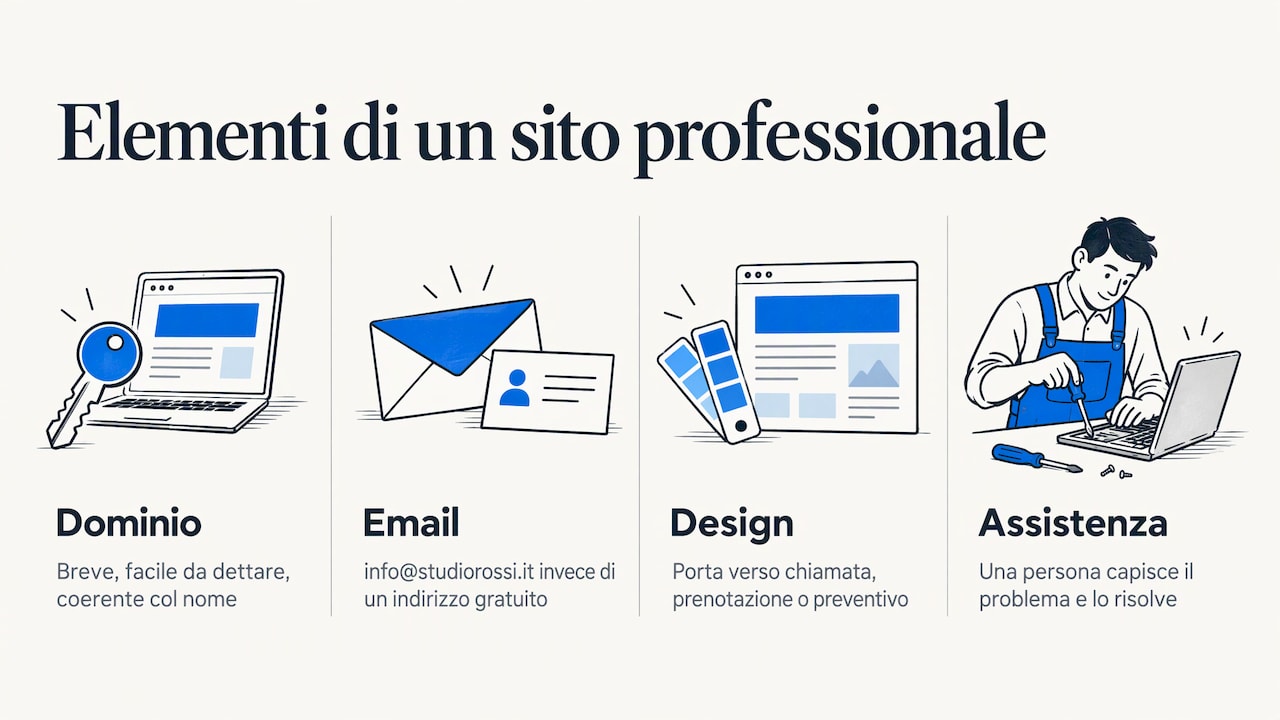
The domain. This is your address on the web, such as studiorossi.it. It should be short, easy to spell out over the phone and consistent with your business name. A website hosted on a free subdomain (such as tuonome.piattaforma.com) immediately says “temporary”. If you have not chosen one yet, read our guide on how to choose a domain name.
The hosting. This is the space on a server—a computer that is always on and connected to the Internet—where your website's files live. Your site's speed, uptime and security depend on it. If the term sounds vague, here is what web hosting is, explained without the jargon.
Email with your domain. Sending a quote from info@studiorossi.it rather than a free email address changes how the recipient sees you. We cover this in our guide to domains with email.
Custom design. An off-the-shelf template looks like thousands of other websites. A site designed around your business highlights what makes you different, uses your colours and guides visitors towards the action you want them to take: calling, booking or requesting a quote. It is also the first building block of your online branding.
Mobile-friendly design. Many of your customers will look for you on their phones. A site that is hard to read on a small screen loses enquiries every day. Learn more in our guide to responsive websites.
Support. This is the element nobody looks at when buying, and everyone misses when it is not there. An email that never arrives, an expired certificate, a contact form that stops working: at that point, what matters is speaking to someone who understands the problem and fixes it.
The pages you cannot do without
A website for professionals or a small business does not need to be huge. It needs to answer the questions a potential customer has. According to a guide to small business websites, these are the essential pages:
| Page | Purpose | What to include |
|---|---|---|
| Home | Show who you are and what you offer at a glance | A clear statement, a prominent call to action, your main services |
| About us | Build trust | Your story, people, real photos, expertise |
| Services or products | Explain what the customer is buying | Specific descriptions and, where appropriate, prices |
| Contact | Turn interest into an enquiry | Phone number, email, form, address, opening hours, map |
| Testimonials or case studies | Demonstrate results | Reviews from real customers, completed work |
| Blog | Answer customers' questions and get found on Google | Useful articles about your industry |
The same guide points out that you can add online payments, SEO settings for each page and analytics tools, and that buttons, forms, links and payments should be tested on mobile devices before launch.
Alongside these pages, always include your business details at the bottom of every page (registered business name, VAT number, registered address), plus privacy and cookie pages. If you work in a regulated profession, check with your professional body which information is required or prohibited in online communications.
Three ways to create a professional website
Anyone looking into how to create a professional website has three routes to choose from. The main differences are how much of your own time you invest and who responds when you need help.
One partner for your domain, hosting and custom website
This is the route we recommend for anyone who wants a professional website without becoming a technician. A single point of contact registers your domain, sets up hosting, activates email accounts and builds the website around your business. You provide information about your work; someone who does this every day handles the rest. The benefit is not just the time you save: when something stops working, there is one person to call, rather than three providers passing the blame.
Subscription-based website builders
These are platforms with ready-made templates you can drag, drop and customise. Writing, page layout and configuration are still your responsibility, as are the technical decisions about SEO, email and your domain. The monthly fee continues for as long as your website stays online, and if you want to switch one day, moving your site elsewhere is not always straightforward.
Working with several providers
A domain from one provider, hosting from another, and a designer or developer for the website. It can work, but you have to coordinate everyone, keep track of login details and work out who is responsible when the site will not load. For a small business, this is often the most time-consuming option.
How much a professional website costs
The most common question is also the one whose answer is most often misunderstood. The starting price matters little: what matters is how much you spend to keep your website online, up to date and secure over time.
To compare offers fairly, look at a three-year period and separate two types of costs:
- Initial costs: website design and development, domain registration if applicable, email setup.
- Recurring costs: domain renewal, hosting, email accounts, any licences, maintenance and support.
For each item, ask three questions: is it included in the first year? How much does renewal cost? Is VAT included or added on top?
A practical example
Take a well-known subscription-based website builder. According to an analysis of its plans for Italy in 2026, the basic plan costs €14 per month, billed annually and excluding taxes. A custom domain is free for the first year only, professional email is purchased separately, and some additional apps may cost extra.
Let us do the maths over three years:
- Subscription: €14 × 36 months = €504, plus 22% VAT, bringing the total to around €615.
- Domain: renewal fees apply from the second year.
- Professional email: a separate annual cost for each account.
- Extra features: advanced forms, bookings or other features may add more subscription fees.
- Your time: the hours spent building, updating and troubleshooting on your own.
The point is not whether a monthly fee is expensive or cheap. The point is that a “from” price excluding VAT, with a domain that is free only at the start, does not tell you what you will actually spend. That is why, when assessing a provider, it makes sense to favour those who publish clear, VAT-inclusive prices with no hidden charges. If you need a reference for thinking through individual development costs, a website cost calculator can help you put together your list before requesting a quote.
Be careful with “SEO included”, too: ask which specific tasks it covers, such as titles and descriptions for each page, content structure, speed and connecting the site to Google's tools. To get an idea of what a clearly defined SEO service includes, look at how individual tasks are listed and ask for the same level of detail.
How to create a professional website, step by step
Here is the full process, including the points where people commonly go wrong.
-
Write a short brief. Half a page is enough: what you do, who your customers are, what action you want them to take on your site (call you, book, request a quote), which services to present, in which languages, and what materials you already have (logo, photos, text). The typical mistake is to start with the visuals rather than the goal.
-
Choose and register your domain. Keep it short, without unnecessary hyphens, and easy to say. The most costly mistake is registering it in someone else's name, such as the consultant building your website: the domain must be registered in your name. With us, you register your domain with no lock-in: it stays yours.
-
Set up suitable hosting. A business website needs a security certificate (the padlock in the browser), regular backups and consistent performance. You will find the criteria in our guide to hosting for business websites and our guide to secure hosting for businesses. We offer secure hosting with quick activation.
-
Create your email accounts. At least one general address (info@) and one for each person who communicates with customers. Setting them up properly helps keep your messages out of spam folders. Managing email accounts is one of the services we handle for our customers.
-
Design and build the website. This is where you decide whether your site will reflect your business or look like everyone else's. A custom website starts with your brief and builds pages, copy and user journeys around your customers. We explain what a complete project should include in our guide to turnkey websites.
-
Prepare the content. Simple wording, short sentences, real photos. Write as you would speak to a customer in your office, not as you would in a brochure. Each page should answer a specific question.
-
Check everything before launch. The next section covers this in detail.
-
Publish and keep your site active. Update services and opening hours, add reviews and the occasional article. A website that has not changed in years makes the business look inactive too.
What to check before publishing
Before announcing your new website to customers and suppliers, run through these checks.
Ownership. Is the domain registered in your name? Do you have access to the control panel and login details? Can you transfer it whenever you want? If the answer to any of these questions is no, clarify it straight away.
Security. Does the site open with https and the padlock? Are there automatic backups? Who steps in if the site is attacked? Keep our guide on what to do with a hacked website handy.
Smartphones. Open every page on your phone: can you read the text without zooming in? Are the buttons easy to tap? Can you call the phone number with one tap?
Links and forms. Click every menu item and every button. Submit the contact form and check that the message actually arrives. For an organised approach to checking broken links, follow a checklist and note every error.
Speed. Oversized images are the most common cause of slow loading. Resize them before uploading.
Basic SEO. Does each page have its own title and description? Does the copy use the words customers actually search for, such as “accountant in Bergamo” rather than “integrated tax solutions”?
Legal information. Are your registered business name, VAT number, privacy and cookie information visible and up to date?
Your website with ViceSite
If you want a professional website without getting lost in control panels, renewals and technical terms, ViceSite brings your domain, secure hosting, email accounts and custom website together in one place. Prices are clear and include VAT, with no hidden costs, and your domain comes with no lock-in. There are three steps: choose your service, pay securely and get immediate activation.
When you need help, you speak to real people on our Italian team, with no call centres and no lost support tickets. Explore domains, hosting and custom websites or, if you already have a website to move, request your hosting.
Our perspective
People who contact us for a website usually do not have a technical problem: they have a business to run and little time. A website is a tool. It should bring in customers, not take hours away from their real work.
That is why we believe domains, hosting, email and websites should stay together, managed by the same people. Every extra handoff between different providers is another opportunity to lose a password, miss a renewal or be unsure who to turn to.
We also believe pricing should be easy for anyone to understand: VAT included, no surprises, no domain lock-in. Your business name on the web belongs to you, and it should stay that way.
And we believe in plain speaking. If something can be explained without jargon, that is how we explain it. Professionals and small businesses deserve a custom website and support in Italian that actually responds.
Sofia
Frequently asked questions
How much does it cost to build a professional website?
It depends on how many pages and features you need, but a fair comparison looks at three years, adding up development, domain, hosting, email and support. Always ask whether VAT is included and how much renewals cost after the first year. A low introductory price with many separate charges can cost more than an all-inclusive offer.
Does a website for professionals need its own domain?
Yes, if you want to look trustworthy. A domain with your name or your practice's name is easier to remember, lets you use matching email addresses and stays yours even if you change providers one day.
How long does it take to get a professional website online?
Domains, hosting and email can be activated quickly. Custom design and content are what really take time: having your brief, logo, photos and copy ready can shorten the process significantly.
Can I update the website myself after it is published?
For everyday changes such as opening hours, services or new articles, yes, provided the site is built to allow it. For everything else, it is helpful to have Italian-language support you can turn to, so you do not have to become a technician to keep your site in good shape.
Sources
- How to create and manage a small business website
- How much does Wix cost? A complete guide to plans in 2026
Recommended reading
Ready to take your business online?
Search your domain: in two minutes you'll know if it's free and what it costs, VAT included.
Find your domain