
Websites · Published on November 20, 2026
Website maintenance: what it includes, how often and costs
ViceSite · Vicedomini Softworks srl
What website maintenance includes, how often to do it, what it costs in 2026 and why a single point of contact makes sense for small businesses.

Website maintenance is the ongoing work that keeps your site secure, fast and up to date after launch: software updates, verified backups, security checks, domain and certificate renewals, and fresh content. For a small business or independent professional, it is not something you do once and forget about, or improvise in the evening after closing. The simplest approach is to start with solid foundations: your domain, hosting and website all in one place, with an Italian-speaking contact to call when something goes wrong. That is how we work at ViceSite. This guide explains why it makes sense, what needs doing, how often and how much it costs.
At a glance
- Maintenance has two sides: technical (updates, backups, security, performance, renewals) and content (text, prices, opening hours, links).
- A practical schedule has three intervals: quick checks every week, tests and reviews every month, and renewals and cleanup once a year.
- In 2026, market rates range from €50 to €150 per month for a brochure website, and from €200 to €500 per month for an e-commerce site.
- Cutting corners on maintenance can be expensive: a single emergency fix can cost up to €3,000.
- The fewer providers you have, the easier it is to keep everything in order: domain, hosting and website with a single point of contact who speaks your language.
Contents
- What website maintenance means
- Routine maintenance tasks
- How often to carry out maintenance: the schedule
- How much website maintenance costs
- The “website under maintenance” message: what it means
- Do it yourself or hire a professional?
- Our perspective
- Domain, hosting and website with a single point of contact
- Frequently asked questions
- Sources
What website maintenance means
A website is not a printed flyer. It is a small system made up of several parts that change over time: the domain (the address, such as tuaazienda.it), the hosting (the server that stores the files and displays them to visitors), the CMS (the software used to manage pages, such as WordPress) with its plugins (extensions that add features, from a contact form to a shopping cart), and finally the content. If you want a refresher on the basics, we have explained what a domain is and what web hosting is in two dedicated guides.
Each of these parts ages. Software receives updates that close security gaps, certificates expire, links to external pages stop working, and your business prices and opening hours change. Maintenance means keeping up with these changes rather than being caught out by them.
There are usually three types of maintenance work:
- Routine: recurring, predictable tasks such as updates, backups and regular checks.
- Non-routine: larger changes, such as a new section, a redesign or migration to another server.
- Preventive: everything done to avoid failures before they happen, from monitoring to recovery tests.
For business owners, routine maintenance is what matters day to day. It determines whether the website remains a reliable online business card or becomes a problem.
Routine maintenance tasks
Here is what it includes in practice, and where people usually go wrong.
1. CMS, theme and plugin updates
Each update brings security and compatibility fixes. The most common mistake is clicking “update all” without a recent backup and without checking the site afterwards: a single incompatible plugin can stop a contact form or online shop checkout from working. The correct order is always the same: back up, update, check the main pages.
2. Backups and recovery tests
A backup is a complete copy of your files and database that you can restore if something breaks. The weak point is not making one; it is not knowing whether it works. A backup that has never been restored is a hope, not a guarantee: that is why monthly checks include a recovery test. Keeping copies outside the main server also prevents you from losing both the website and its backups in the same incident.
3. Security
Strong, unique passwords for every login, as few administrators as possible, an active SSL certificate (the padlock in the browser bar), and regular checks for suspicious logins. Much depends on the infrastructure: secure business hosting does part of the work before you even begin. If you notice strange redirects, pages you did not create or warnings from Google, read our guide on how to spot a hacked website and act immediately.
4. Performance and uptime
Your website needs to load quickly and remain accessible. Uptime is the time the site stays online: a monitoring system alerts you if it goes down, rather than leaving you to find out from a customer on the phone. Each month, it is worth checking the speed of your main pages and reducing oversized images.
5. Forms, links and key features
Actually test your contact form, booking system and shopping cart. A form that does not send emails can remain broken for weeks without anyone noticing, and every lost enquiry is a lost customer. Also check that the email accounts linked to your domain receive messages correctly: with a domain with professional email, your email address and website stay aligned.
6. Content
A website that works but is still stuck in 2022 looks neglected. Opening hours, price lists, services, team photos and contact details all need to reflect reality. If you send a newsletter, keep your website and communications in sync: a newsletter page updated alongside your site helps you avoid promising offers the website no longer shows.
7. Domain and certificate renewals
It is the simplest and most painful mistake: the domain expires, and the website and email stop working. Once a year, check renewal dates, billing details and the domain registrant, which should be your business.
How often to carry out maintenance: the schedule
A practical framework proposed by a maintenance checklist published in 2026 divides the work into three intervals. Here is our summary:
| Frequency | What to do | Common mistakes |
|---|---|---|
| Every week | Verify that backups have run, apply updates, check uptime alerts | Updating without a recent backup |
| Every month | Recovery test, security review, form and link testing, performance analysis, brief report | Assuming the backup works |
| Every year | Review and renew domains and certificates, review DNS and hosting, remove unused users, plugins and outdated content | Leaving unused users and plugins in place |
The DNS mentioned in the table refers to the settings that connect your domain to the website server and email service: just one incorrect value can stop your website or email from working. A brochure website with a few pages and plugins takes less time to maintain each round; an e-commerce site, with payments and customer data, needs closer attention and usually more frequent checks.
How much website maintenance costs
The price mainly depends on three factors: how complex the site is, how many plugins and integrations it uses, and how much an hour of downtime affects your business. The 2026 market rates reported in this maintenance cost analysis give a rough idea:
| Website type | Indicative monthly range (2026) |
|---|---|
| Brochure website with 5 to 10 pages | €50–150 |
| WordPress with plugins and a blog | €100–300 |
| E-commerce | €200–500 |
| Custom web application | From €300 to over €1,000 |
The same analysis notes that annual billing usually comes with a 10–15% discount. These figures do not include the fixed costs of domain and hosting, which need renewing regardless.
Why the cheapest plan costs more
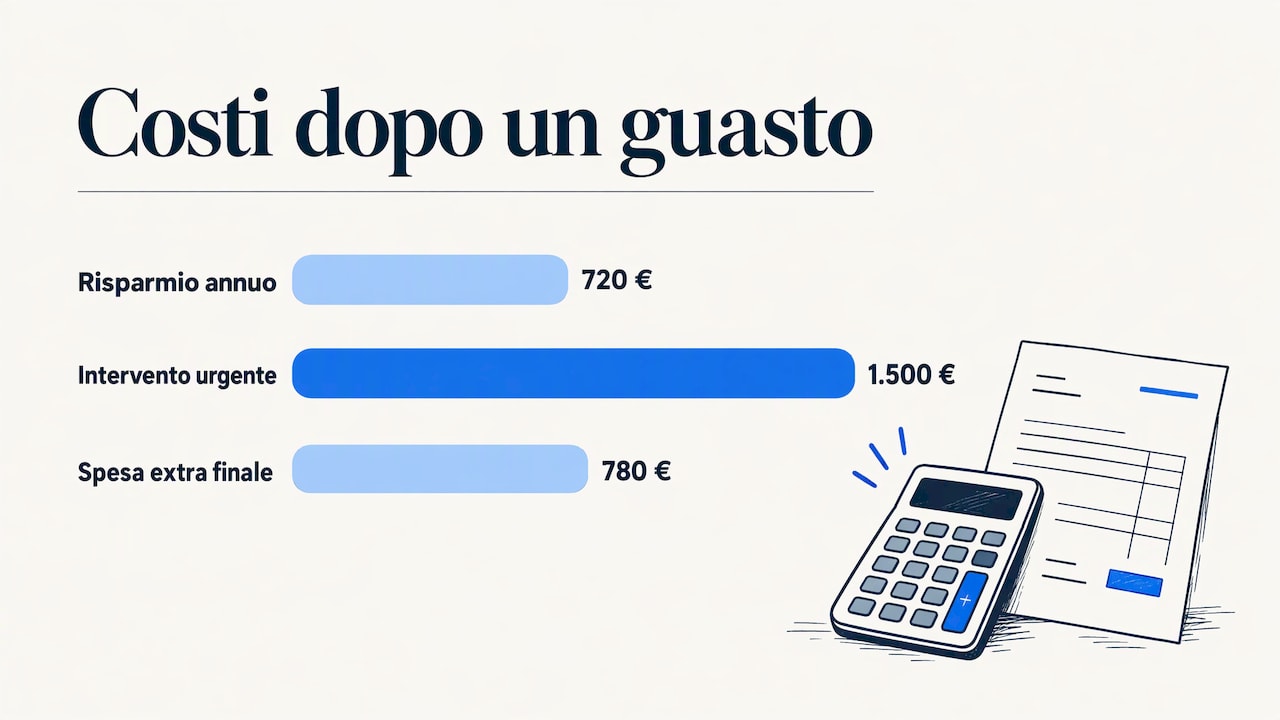
The monthly price means nothing unless you know what is included. According to the same source, €20-per-month plans often amount to clicking “update” once a month, with no testing and no backups. When an update breaks the checkout or an attack goes unnoticed, an emergency fix costs €500 to €3,000 for a single incident, while a one-off cleanup after an attack costs €300 to €1,000. Just one crisis a year can wipe out all the savings.
Here is a practical example. A small professional practice with a brochure website chooses a €20-per-month plan instead of an €80 one, saving €720 a year. If an untested update takes the site offline and an urgent €1,500 fix is needed, it ends up spending €780 more, not counting the enquiries lost during the downtime. So before comparing prices, always ask: are backups included and verified? Are updates tested? Who responds when the site is down, and how quickly?
The “website under maintenance” message: what it means
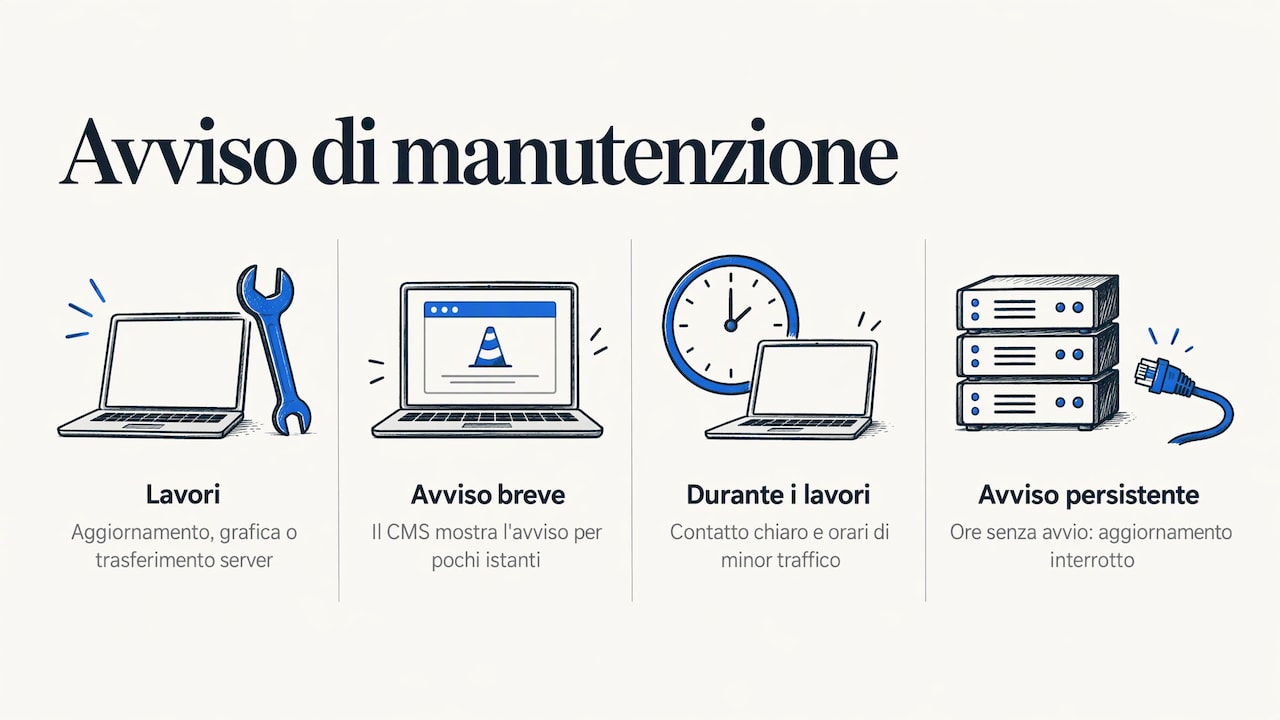
If you open a website and see a page saying “website under maintenance” or “we’ll be back soon”, the owner has enabled a temporary mode while carrying out work: an update, a redesign or a move to another server. During automatic updates, some CMS platforms display a similar notice for just a few moments.
If you own the site, keep the maintenance page active for as little time as possible, clearly explain how people can contact you in the meantime, and schedule the work for quieter hours. If the notice stays up for hours when you have not started any work, it is a sign that an update stopped halfway through: it is time to call your hosting provider, not try random fixes.
Do it yourself or hire a professional?
Can you do it yourself? The individual tasks are simple, but maintenance requires consistency, checks and quick decisions when something goes wrong. For someone with a business to run, the real cost is not the subscription: it is time taken away from customers and the risk of noticing a problem too late.
The points where DIY maintenance usually falls short are always the same:
- Consistency: in the first month, everything gets checked; by the sixth, nothing does.
- Scattered providers: the domain is in one place, hosting in another, and the website was built by a freelancer you can no longer reach. When something breaks, nobody feels responsible.
- Technical language: an error message in English, a ticket left open for days, a reply full of acronyms.
- A forgotten deadline: the domain was not renewed because the credit card had changed.
That is why the best choice for a small business is less about who clicks the update button and more about the foundations the website rests on. Well-chosen business website hosting and a thoughtfully built turnkey website reduce the work needed; a single point of contact for your domain, hosting and website saves you from having to work out who to call.
Our perspective
Many business owners do not have a technology problem; they have a problem knowing who to turn to. The domain is registered in one place, hosting is elsewhere, and the website was built by someone who no longer replies. When work is needed, maintenance turns into a treasure hunt.
For us, maintenance starts before the first update: with secure hosting, a domain registered in your name with no lock-in, and a custom website built to last. When these pieces are all in one place, keeping your site in order becomes simple.
And when something goes wrong, you want to speak to a real person, in Italian, without call centres or tickets that get lost. That is how we work, with clear prices including VAT, because your website should support your business, not keep you awake at night.
Sofia
Domain, hosting and website with a single point of contact
With ViceSite, you can register your domain, activate secure hosting and have your custom website built all in one place, with clear prices including VAT, no hidden costs and no domain lock-in. The process has three steps: choose your service, pay securely and get instant activation.
Support comes from real people, in Italian: when you have a question about your website, you know exactly who to contact. If your website needs a stronger foundation, you can request hosting or explore domains, hosting and custom websites directly on our site.
Frequently asked questions
How much does annual website maintenance cost?
It depends on the type of site. Based on 2026 market rates, a brochure website costs around €600–1,800 per year (€50–150 per month), while an e-commerce site costs €2,400–6,000 per year. Domain and hosting costs are additional, and annual billing often comes with a 10–15% discount.
How often should a website be updated?
Check for CMS and plugin updates every week, always after verifying the backup. Each month, it is worth testing forms, links and recovery, and once a year reviewing renewals, DNS and hosting.
What happens if I do not maintain my website?
The site becomes slower, more vulnerable to attacks and less reliable for visitors. An outdated plugin can provide an entry point for an intrusion, and an expired domain takes both your website and email offline. Fixing things afterwards almost always costs more than prevention.
How can I tell if a website is under maintenance?
Usually, a page appears with a notice such as “website under maintenance” or “we’ll be back soon”, and the rest of the content is unavailable. If it is your website and you have not started any work, an update may have been interrupted: contact your hosting provider immediately.
Sources
- Website maintenance checklist, Uptimecheck (2026)
- How much website maintenance costs in 2026, SiteGrade
Recommended
Ready to take your business online?
Search your domain: in two minutes you'll know if it's free and what it costs, VAT included.
Find your domain