Hosting · Published on November 23, 2026
WordPress hosting with support: how to choose it for your small business
ViceSite · Vicedomini Softworks srl
WordPress hosting with Italian-language support: what it should include, requirements, backups, real renewal costs and how to choose without the technical jargon.

WordPress hosting with support is only as good as the people who answer when your site goes down, a plugin breaks your contact page or a renewal costs more than expected. For a small business, an independent professional or a startup, the right choice isn't the plan with the most gigabytes on the list. It's the one that combines servers suited to WordPress, Italian-language support you can actually reach and prices that stay clear after the first year. That's exactly how we work at ViceSite: secure hosting, a domain and a custom website, with an Italian team that responds directly, without call centres or endless ticket handoffs. This guide explains what to check, what it really costs and how to find out, before signing up, whether the promised support is real.
At a glance
- “With support” should mean people who speak your language, understand WordPress and take action—not just a contact form.
- Check that the server meets WordPress's recommended requirements, starting with PHP 8.3 and HTTPS.
- Automatic backups and a tested restore process matter more than any promise of “unlimited” space.
- Compare costs over three years, including VAT: many promotional prices double at renewal.
- A single point of contact for your domain, hosting, email and website saves you from providers passing the buck.
Contents
- What “WordPress hosting with support” really means
- Managed vs traditional WordPress hosting: the differences
- Technical requirements to check, without becoming a system administrator
- Backups and restores: the real test of support
- Maintenance: updates, security and maintenance mode
- What it costs: list price and the real cost over three years
- How to choose in five steps
- Our hosting with Italian-language support
- Our perspective
- Frequently asked questions
- Sources
What “WordPress hosting with support” really means
Hosting is space on a server that's always on and connected to the Internet, where your website's files and database live. WordPress is the software you use to manage pages, posts and images. Hosting “with support” is a service that gives you not just space, but someone to help when something goes wrong. If you'd like to revisit the basics, we've explained how web hosting works in simple terms.
The problem is that “support” covers very different things. Sometimes it means a collection of articles you have to work through yourself. Other times it's a ticket system where your request gets passed from one agent to another and an answer takes days. Or it might be a chat that sends you to a guide in English.
For anyone running a business, useful support has three key qualities:
- Language and clarity. Someone answers in Italian, explains the problem without technical jargon and tells you what happens next.
- Direct access. You know who to email or call, and you don't have to start from scratch with a different agent every time.
- Knowledge of your website. The person responding knows WordPress and the service you've bought, so they don't just tell you “the server is working” while your website displays a blank page.
User reviews back this up: even major providers offering round-the-clock support in Italian receive lukewarm feedback on their support. An independent review from June 2026 gives one of these services a score of 6 for support, noting potentially lengthy response times and difficulties when cancelling.
Managed vs traditional WordPress hosting: the differences
Anyone looking for managed WordPress hosting wants to know one thing: how much technical work will still be their responsibility? With traditional hosting, you get space and a control panel, and everything else—installation, updates, backups and security—is up to you. With a managed service, the provider handles some of these tasks.
| Aspect | Traditional hosting | Hosting with support and management |
|---|---|---|
| Server configuration | You choose it in the control panel | Already set up for WordPress |
| SSL certificate (the HTTPS padlock) | Often needs manual activation | Usually included and active |
| Backups | You schedule and check them yourself | Automatic, with help restoring them |
| Website problems | Forums, guides, generic support tickets | People who know your service |
| Suitable for | Technical specialists and developers | Small businesses, professionals, startups |
The difference isn't in an acronym, but in who takes responsibility when your website stops working. For a business that relies on its website to be found by customers, every hour of downtime has a cost. That's why, when assessing an offer, you should always ask explicitly what's included and what isn't: updates, backups, malware removal, migration from another provider. We cover this in more detail in our guide to what secure hosting should guarantee.
Technical requirements to check, without becoming a system administrator
You don't need to know how a server works to ask the right questions. A few points are enough, and a reputable provider will give you a clear yes or no.
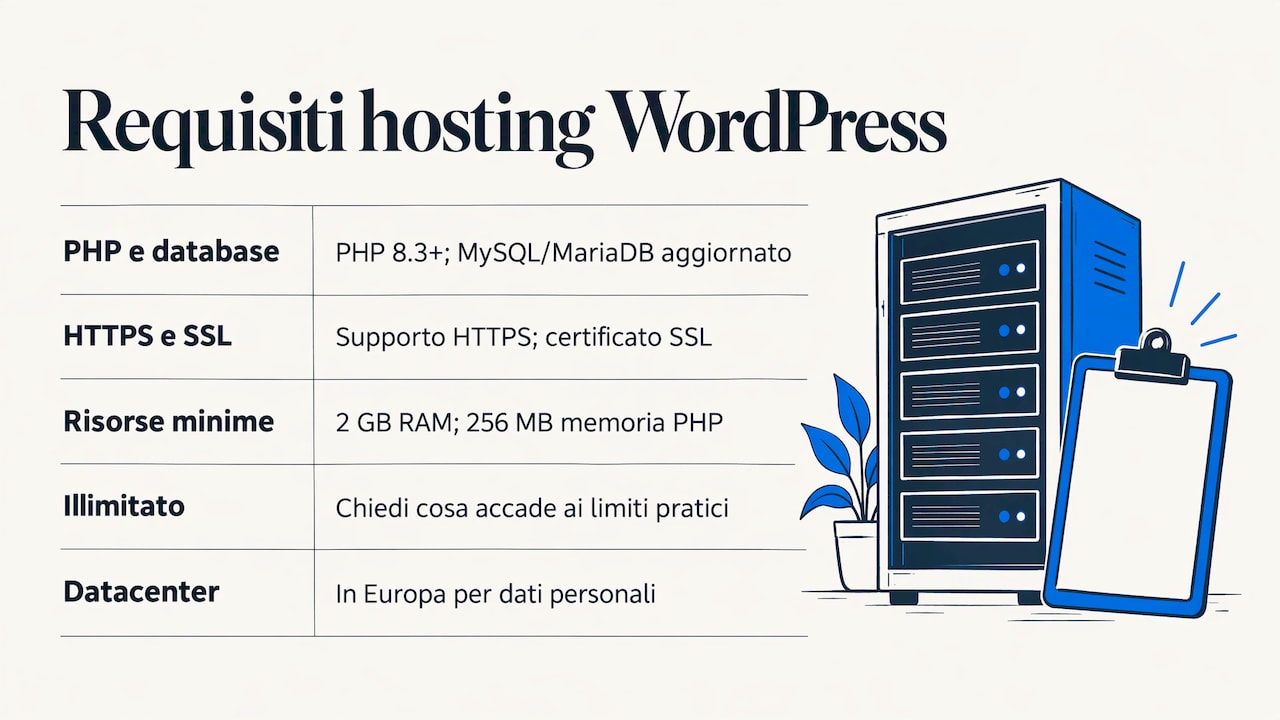
PHP version. PHP is the language WordPress is written in. The official WordPress requirements recommend PHP 8.3 or higher, along with an up-to-date MySQL or MariaDB database and HTTPS support. An old version makes your website slower and more vulnerable to attacks.
Resources. Memory (RAM) and processing power determine how many visits your website can handle at once. Industry guides suggest 2 GB of RAM and 256 MB of PHP memory as a reasonable starting point. Choosing the bare minimum to save a few euros is a bad idea: as an Italian guide to choosing WordPress hosting points out, websites on under-resourced plans buckle at the first traffic spike.
What “unlimited” means. “Unlimited” storage and traffic always have practical limits. The question to ask is: what happens when my website reaches them? Does it slow down, go offline, or trigger a notification? Real support tells you beforehand, not afterwards.
SSL included. An SSL certificate encrypts data between the website and its visitors and displays the padlock in the browser. Today it's essential, including for customer trust.
Server location. If your website collects personal data, for example through a contact form, a data centre in Europe makes it easier to comply with the General Data Protection Regulation (GDPR), the EU regulation governing how people's data must be handled.
Backups and restores: the real test of support
A backup is a complete copy of your website. For WordPress, that means two separate parts: the files (theme, plugins, images) and the database, which holds text, pages and settings. A restore only works if you have both, from the same version.
The official WordPress backup documentation recommends keeping copies in multiple locations, not just in your hosting account. The reason is simple: if that account itself is affected, the copies stored there may become inaccessible too.
What to ask your provider:
- How often are backups made? For a business website, daily backups are the standard to look for.
- How many days are copies kept? A problem discovered after a week requires a copy from at least eight days earlier.
- Who handles the restore? This is where the difference shows. Restoring a site yourself means uploading the files again, importing the database and, if the credentials change, editing the WordPress configuration file. One mistake in any of these steps can leave your website offline.
- How long does it take? Ask for a specific estimate, not a vague “as soon as possible”.
If your website has been compromised, restoring it is only part of the job: the vulnerability must be found and fixed, otherwise the attack will happen again. Our guide to what to do with a hacked website explains the warning signs and the first steps to take.
Maintenance: updates, security and maintenance mode
WordPress, themes and plugins receive ongoing updates, often to fix security vulnerabilities. Falling behind is the most common cause of website breaches. Updating everything blindly, however, can break things: a single plugin that's incompatible with the new version can stop a form or shopping cart from working.
Proper maintenance follows a specific sequence:
- a full backup before every update;
- updates to WordPress, the theme and plugins;
- checks of key pages, forms and features that generate enquiries or sales;
- an immediate restore if something goes wrong.
During updates, WordPress briefly shows visitors a maintenance notice, then returns to normal. But if you need to spend hours working on a new section, the right solution is a temporary maintenance page that keeps at least your contact details visible—or, better still, a test copy of your website where you can make changes before publishing them. That way, customers never find a blank page.
To understand how often to carry out these tasks and how much to budget for them, read our guide to website maintenance.
What it costs: list price and the real cost over three years
The headline price on an offer page is rarely what you'll actually pay. Three common pitfalls come up again and again.
Renewals. Many plans start with a promotional price that rises in the second year. The June 2026 review mentioned earlier gives the example of a WordPress plan costing €0/month for 12 months, then rising to €10/month: around €240 plus VAT over three years, despite the free first year.
VAT. Many hosting prices exclude VAT. On an annual cost, 22% makes a difference, especially when comparing offers that display it differently.
Separate services. Backups that can be restored on request, certificates, email accounts, migration, recovery after an attack: in some cases, these are extras you only discover when you need them.
The calculation is simple: take the first-year cost, add two years at the renewal price, add VAT if it's not included, and add any extra services you'll use. The resulting figure is the one to compare. Clear VAT-inclusive prices, like ours, make this comparison straightforward.
How to choose in five steps
- Start with what your website needs to do. A showcase site for an independent professional, a business website with a contact form and a small online shop have different resource needs. If you're unsure, our guide to choosing hosting for your business website helps you work them out.
- Write down your technical questions. PHP version, SSL, daily backups, a European data centre, actual resource limits. Assess how clear the answers are, not just what they say.
- Test support before buying. Email or call with a specific question: does a person answer? In Italian? Without sending you to a guide?
- Calculate the cost over three years, including VAT. It's the only fair way to compare offers.
- Check who owns the domain. Your domain is your website's address and your online name: it must remain yours, and you must be free to move it if you ever want to. Think about email accounts too: a professional email address on your domain should be managed alongside everything else.
Our hosting with Italian-language support
With ViceSite, everything you need to get online is in one place: domain registration, secure hosting, email accounts and, if you want, a website custom-built for your business. Prices are clear, with VAT included and no hidden costs, your domain remains yours with no lock-in, and activation takes three steps: choose your service, pay securely and your service activates immediately.
When you need help, our Italian team responds directly. You can request your hosting or explore all our services on ViceSite.
Our perspective
When business owners tell us about their previous hosting, the story is almost always the same: the technical problem could have been solved, but what was missing was someone to talk to. A request opened and passed from one agent to another, an answer full of acronyms, a renewal costing more than they remembered.
That's why we believe choosing WordPress hosting starts with the people. Technical specifications matter and should be checked, but small businesses, independent professionals and startups shouldn't have to become server experts to have a website that works.
We built ViceSite around this idea: real support in Italian from real people, simple processes, clear VAT-inclusive prices and no domain lock-in. Having your domain, hosting, email and custom website under one roof means a single point of contact who knows your project and doesn't send you elsewhere.
Your job is to grow your business. Ours is to make sure your online presence doesn't become one more thing to worry about.
Sofia
Frequently asked questions
Do I need WordPress-specific hosting?
WordPress works on many hosting services, but performs best on servers configured to meet its requirements, with up-to-date PHP and HTTPS enabled. For a business, what matters most is having a provider that knows WordPress and helps when something goes wrong. That way, you don't have to handle the technical side alone.
Can I move my WordPress website from another hosting provider?
Yes: moving it involves transferring files and the database, then pointing the domain to the new server. It's a delicate process, because a mistake can leave your website offline. Before starting, discuss it with the new provider and make sure you have a complete, up-to-date backup.
What is the cheapest WordPress hosting?
The cheapest option is the one that costs least over three years, not the one with the lowest starting price. Add up the first year, renewals, VAT and any extra services, then compare. An offer with a stable price and VAT included often works out cheaper than a promotion that doubles at renewal.
Is WordPress reliable for a business website?
Yes, as long as it's kept up to date and hosted on a suitable server. Most security problems come from outdated plugins and versions, not WordPress itself. Regular updates, daily backups and support that acts quickly make it a solid foundation for your business.
Sources
- WordPress: recommended hosting requirements
- WordPress: official backup documentation
- Regulation (EU) 2016/679, GDPR
- How to choose reliable WordPress hosting: the guide
- 2026 hosting review: prices, renewals and support
Recommended reading
Ready to take your business online?
Search your domain: in two minutes you'll know if it's free and what it costs, VAT included.
Find your domain