
Domains · Published on November 14, 2026
Finding an available domain: how to check and register it
ViceSite · Vicedomini Softworks srl
How to check whether a .it or .com domain is available, read WHOIS results, handle a name that’s already taken, and register yours without the hassle.

It only takes a few seconds to find out whether a domain is available: enter the name, including its extension (for example, pasticceriarossi.it, without “www”), into the search tool of the official registry or a registrar, and you’ll get an immediate answer. What really makes the difference comes next: choosing a name that will stand the test of time, understanding what “unavailable” means, and securing the name before someone else does. This guide walks you through checking .it and .com domains, reading the results, deciding what to do if the name is taken, and turning an “available” domain into “yours” in three steps.
At a glance
- For a .it domain, the official check is through Registro .it (the “Find your .it” service and WHOIS); for .com and other generic extensions, use a registrar’s search tool or ICANN’s lookup tool.
- “Unavailable” doesn’t always mean “registered by someone else”: the name may be reserved, or the domain may be in the process of being deleted.
- If the name is taken, it’s better to adjust it slightly or rethink it rather than fall back on plurals, hyphens, or accents that send customers elsewhere.
- Registro .it does not sell domains to individuals: registration always goes through a registrar, which is when it helps to have someone who speaks your language by your side.
- A name that’s available today may not be tomorrow: register it as soon as you find it.
Contents
- What an “available domain” actually means
- How to check whether a .it domain is available
- What about .com, .eu, and other extensions?
- How to read WHOIS results
- If the name you wanted is already taken
- How to choose a name worth searching for
- From “available” to “yours”: how to register
- Our perspective
- Frequently asked questions
- Sources
What an “available domain” actually means
A domain is available when no one has registered it and the registry’s rules allow it to be assigned. Each extension has its own registry, the body that maintains the official list of assigned names: for .it, this is Registro .it, managed by the CNR’s Institute of Informatics and Telematics in Pisa. Alongside the registry are registrars, the companies that actually register domains on behalf of those who want them, and registrants, the businesses, professionals, associations, and individuals who become their holders. This is the three-party model described in Registro .it’s 2026 press kit, which estimates that around 380 million domains are registered worldwide across all extensions (CENTR data as of September 2025).
With numbers like these, almost all short, generic names are already taken. For a small business, the takeaway is simple: your search will work better if you start with a shortlist of carefully considered names rather than a single idea.
Three situations can produce an “unavailable” response:
- The name is already registered by someone. This is the most common case.
- The name is reserved: some combinations cannot be assigned under the registry’s rules, as explained on Registro .it’s page about how to register a .it domain.
- The domain is being deleted: the holder has not renewed it or has requested its deletion, but the name is not yet available to register again. We’ll cover this later, as it’s the situation that causes the most confusion.
How to check whether a .it domain is available
Registro .it explains the process in its guide to checking whether a domain name is already registered: search the WHOIS database by entering the full name, including “.it”, without “www” at the beginning. The search instantly tells you whether the name is available or in use and, in the latter case, who registered it.
Here are the steps, along with the most common mistakes at each stage:
- Enter the name with its extension. “rossiarredamenti.it”, not “rossiarredamenti” or “www.rossiarredamenti.it”. Common mistake: searching without the extension, or with “www”, so the result doesn’t match what you want to register.
- Check that the name follows the rules. A .it domain can contain letters from a to z, numbers from 0 to 9, and hyphens, with a minimum of 3 and a maximum of 63 characters; it cannot start or end with a hyphen or begin with “xn–”, according to Registro .it’s registration rules. Common mistake: entering spaces, apostrophes, or accented letters and expecting the system to correct them.
- Read the response. “Free” or “available” means you can proceed with registration through a registrar. If the name is registered, the WHOIS record shows the domain’s status, its registrar, and, where the holder has consented, some of their details.
- Note the result and any alternatives straight away. If you’re considering several names, keep track of which ones are available: availability changes constantly, and a name that’s available today could be taken next week.
The search tool on a registrar’s website queries the same registry: you get the same answer, with the added benefit of being able to register the name there and then.
What about .com, .eu, and other extensions?
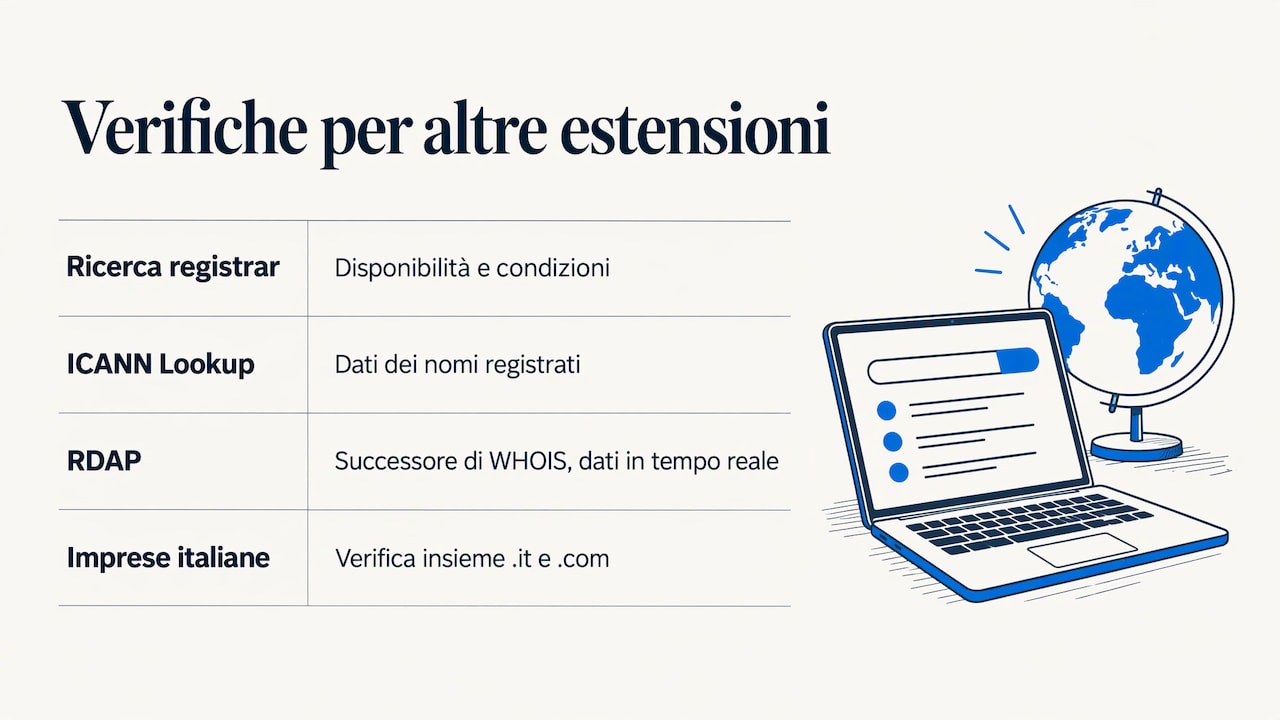
For .com, .net, .org, and generic extensions, the registry is not Italian, but the principle is the same: enter the full name into a registrar’s search tool, which will tell you whether you can register it and under what conditions. To view the details of an already registered name, the official tool is ICANN’s Registration Data Lookup. ICANN is the international organization that coordinates domain names. The tool uses RDAP, the successor to WHOIS developed by the IETF technical community, and displays data supplied in real time by registries and registrars.
A practical tip for Italian businesses: check both the .it and .com versions of the same name. Customers looking for your business are likely to try .it first; owning the .com as well prevents someone else from using it with your name.
How to read WHOIS results
WHOIS is the public directory of domain registration details. For .it domains, according to Registro .it’s WHOIS policy (version 2.2, 2022), a lookup returns details about the registrant, administrative and technical contacts, the registrar, and technical information such as DNS servers.
How much personal information you can see depends on consent. Individuals, sole traders, and freelancers can choose whether to make their details visible, in accordance with the GDPR, the European regulation on personal data protection. That’s why a record sometimes shows the status and registrar but not the holder’s name: it isn’t an error.
There are four situations you may encounter:
| What you see | What it means | What to do |
|---|---|---|
| Available / AVAILABLE | No one has registered the name | Register it straight away through a registrar |
| “ok” or “active” status with an expiry date | The domain is registered and in use | Try a variation or a different name |
| “pendingDelete” status | The domain is being deleted | It cannot be registered yet: wait until it becomes available again |
| Name rejected by the search | The name does not follow the rules or is reserved | Correct the spelling or choose another name |
When a domain is being deleted
When a .it domain is deleted, it does not become available again on the same day. Registro .it’s technical guidelines provide for a 30-day period after the deletion request during which the domain can still be recovered. The name then moves to pendingDelete status and is deleted at scheduled times through the Drop Time procedure; to register a name deleted within the previous seven days, the registrar must send the request to a dedicated registry server.
For you, this means two things. First: if the name you want is in pendingDelete status, make a note and check again over the following weeks. Second: when it becomes available again, it will be available to everyone, so your choice of registrar can make a difference in how quickly you secure it.
If the name you wanted is already taken
It happens at least once to almost everyone. There are three sensible options:
- Adjust the name slightly, keeping the most natural extension for your market. Is “studiobianchi.it” taken? Try “studiobianchimilano.it” or “bianchicommercialista.it”: adding your city or specialty also makes the name clearer.
- Keep the name and change the extension, but only if the alternative makes sense to the people looking for you. For a business operating in Italy, .it is the most natural choice.
- Rethink the name. If the taken name belongs to a competitor or a similar brand, insisting on a variation creates confusion and risk. A more distinctive name makes you easier to find.
What to avoid, according to Registro .it’s Choose Your Name guide:
- A plural when the singular is registered. People typing the address usually try the singular first, so you risk sending your customers to a competitor.
- Hyphens, which can be confused with underscores and are awkward to dictate over the phone.
- Accents, which users forget.
- Ambiguity between zero and the letter O, or words that are often misspelled.
Buying a domain from its current holder is possible, but you need to verify who you’re dealing with, whether they have rights to the name, and how the transfer will take place. For a small business just starting out, finding a strong, available name is almost always the more cost-effective option. Also remember that, as Registro .it warns, registering a domain does not protect you against similar registrations by others: if an identical or very similar name harms your business, an opposition procedure is available to protect you, and it’s worth consulting a lawyer who specializes in trademarks.
How to choose a name worth searching for
Your search will be faster if you start with four or five shortlisted candidates. Registro .it suggests a few practical criteria:
- Moderate length. You have up to 63 characters, but a short, clear name is easier to remember and say aloud.
- Match the domain name to your website or business name, so people who know you can find you on their first try.
- Avoid overly generic names: focus instead on one of your strengths, such as your specialty or location.
- Combine two meaningful words, known as “mix and match”, to create a name that is original and easy to understand.
- Avoid passing trends: your domain will be with you for years, potentially forever.
Before searching, try a simple test: say the name aloud to a colleague and ask them to write it down. If they get it wrong, your customers will too. Your domain name also becomes part of your email address (nome@tuaimpresa.it), so it’s worth considering both together: we explain this in our guide to domains and professional email. If you’re building your business identity from scratch, you’ll find more ideas in our guide to online branding for small businesses.
From “available” to “yours”: how to register
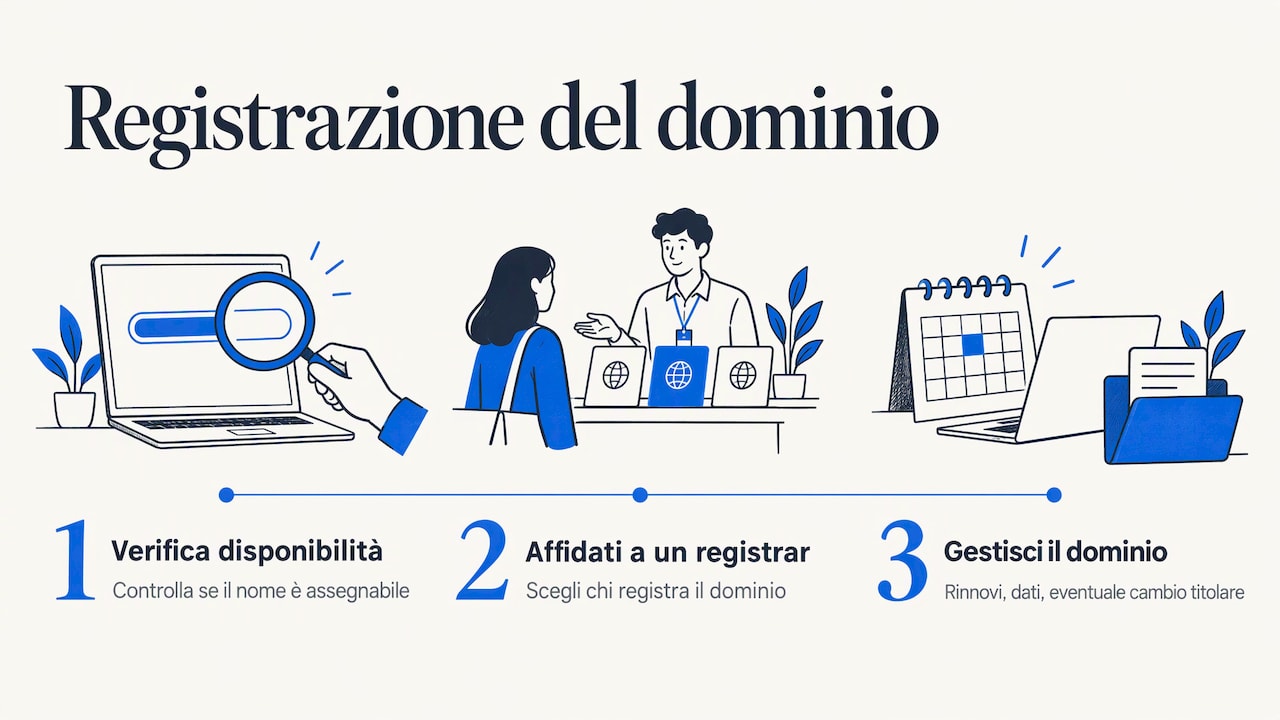
Registro .it does not register domains for end users: it maintains the directory of names, while registrars handle registration, each with its own services and prices, ranging from domain registration alone to a complete website. The official process described on the How to Register page has three steps: check availability, choose a registrar, and then manage the domain over time (renewals, updating details, and any change of holder).
Who can register a .it domain: adults and organizations with citizenship, residence, or a registered office in a European Economic Area country, Vatican City, San Marino, Switzerland, or the United Kingdom.
Where many small businesses get stuck is not the search, but everything that comes afterwards: whose name the domain should be registered in, how to connect it to a website and an email account, what happens at renewal, and what it really costs once VAT is added. This is where choosing who registers it for you matters more than the search itself.
With ViceSite, the process takes three steps: choose your service, pay securely, and your service is activated immediately. Prices are clear and include VAT, with no hidden costs, and the domain remains yours without lock-in. If you have questions, a real Italian team is there to answer, with no call centers and no tickets getting lost.

You can register your domain with ViceSite and add hosting, email accounts, and a custom website in the same place. If a website is already in your plans, read about choosing hosting for business websites or request hosting directly.
Our perspective
People who contact us after finding an available domain usually don’t have a search problem: they need help making a choice and finding someone they can trust. Checking availability is free and instant, as it should be. The value lies in what happens next.
A domain will be your business address for years. That’s why we believe it should be registered with clear, VAT-inclusive pricing and no lock-in tying you to us: the domain is yours, and it should stay that way. If you want to switch providers one day, you should be able to.
We also believe that a small business shouldn’t have to learn technical jargon to get a website and a professional email address. That’s why our process has three steps and, when you need help, someone from our Italian team is there to give you a straightforward answer. The right name, registered properly, is the first building block of your digital identity: it’s worth taking care over it, but not waiting too long.
Sofia
Frequently asked questions
How can I see who registered a domain?
For a .it domain, search Registro .it’s WHOIS by entering the full name: you’ll see its status, registrar, and, if the holder has given consent, their details. For .com and other generic extensions, you can use ICANN’s lookup tool. If personal details are not shown, it’s because the holder has chosen not to publish them, as permitted by the GDPR.
Does checking domain availability cost anything?
No, checking is free both on Registro .it’s website and through registrars’ search tools. You only pay for registration, which must be renewed periodically to keep the name.
If a domain expires, can I register it straight away?
Not immediately. A deleted .it domain goes through a 30-day period during which the previous holder can still recover it, then moves to pendingDelete status and is deleted at scheduled times. Only then does it become available to everyone again.
Can I register a .it domain as a freelancer or startup?
Yes. Adults and organizations with citizenship, residence, or a registered office in the European Economic Area, Switzerland, the United Kingdom, San Marino, or Vatican City can register a .it domain. Freelancers and sole traders can also choose not to make their details public in WHOIS.
Sources
- Registro .it, How to check whether a domain name is already registered
- Registro .it, How to register
- Registro .it, Choose your name
- Registro .it, WHOIS policy version 2.2 (2022)
- Registro .it, Technical guidelines for operations in the .it ccTLD
- Registro .it, Drop Time
- Registro .it, 2026 press kit
- ICANN, Registration Data Lookup
Recommended
Ready to take your business online?
Search your domain: in two minutes you'll know if it's free and what it costs, VAT included.
Find your domain